

Table of Contents
Winchester News posts many stories each week, and some don’t get much time on the landing page due to limited space. Here are some ideas on how to get the most out of the Winchester News, how to browse recent items, and how to find articles of interest to you. By the end of this article, you will be a Power Reader.
There are many ways to read the Winchester News, a digital newspaper dedicated to local news in Winchester, Mass.: the weekly emailed newsletter, the web page, using tags, the archive, and other strategies.
- First, by subscribing to the Winchester News, you will receive an emailed weekly newsletter that summarizes the top stories of the past week.
By clicking on a story, you can read the full article. This is the easiest way to get the local news that affects the town and you, the residents of Winchester. The newsletter just drops into your mailbox to be read at your leisure.
When you do tap on an item in your emailed newsletter, you are connected to the website where the story is published.
- That website is updated all week with new stories. The newest articles are at the top of the page, and older stories are pushed down the page.
I’d like to point out some features of the website that can help you not miss important news.
Notice there are sections just below the masthead, or the big logo at the top of the page: News, Sports, Events, and so forth. Stories that are grouped this way can be viewed by clicking or tapping on that menu. This is the way the landing page is set up.

On a larger screen, for example, your computer, you would see the Feature article front and center with the larger image or photo. After a new Feature article is published, the previous articles shift to the left side column.
Other News articles that don’t have the Feature tag are listed in the right-hand column, with the newest ones on top, and earlier ones below. Those are typically tagged “News” or “Events.”
- Below the three-column section, as you scroll down, you will see an Events section (four articles across) that addresses local events. Press releases for local events are published here at no charge to let our community know about upcoming events.
- Feature articles come next (articles that used to be on the larger centerpiece section at the top of the page, and down the left column), also four across.
- Three “Editor’s Picks” articles come next as you continue to scroll down.
- Sponsorship: Scrolling past the Editor’s Picks, after you have read them, is an area where four spaces are available for sponsorship opportunities.
Your organization can support the Winchester News by purchasing sponsorship space here, or one of the two sponsorship bars at the top of the page. If you would like to be a sponsor, please send an email to editor@winchesternews.org to get pricing and other information.
You can also go to the Contact tab at the top of the page, and sponsorship information is posted there as well.
- Calendar: The very bottom section on the landing page is a calendar that is curated by Town Common, a local Winchester organization that aggregates calendar events from local calendars such as the town government website, the Jenks Center, the Chamber of Commerce, the Winchester Public Library, and other calendars.
Town Common also hosts a comprehensive list of local organizations and hosts community events. For more information see towncomm.org.
If you’re reading on a mobile device, because the screen is relatively small, everything is stacked top to bottom. There is not enough room for a “four across” layout. Otherwise, the content is the same as the web page viewed on a larger screen.
For access to groups of related articles, use Tags. Search is for specific words in articles, although it will also find tags for you. Finally, the Archive and RSS feed are other ways to read current and previously published articles on Winchester News.
- Tags: Tags were mentioned earlier. Those are the green underlined words above the title of an article: tags include News, Sports, Events, Features, and Opinion, which match the tab menu at the top of the landing page.
But there are many other tags such as “Did You Know,” “Death Notice” or “Schools.” Any article might have several tags, which is why it might show up in more than one section, and it’s not “just deja vu.”
Clicking on the tag will show a page with all the articles that have that tag. So all articles relating directly to the “2026 Town Elections” can be gathered in one place to view and read.
- Search: At the top of the page, left of the big Winchester News logo, or masthead, are two icons, the first to switch between light and dark mode, and the other is a magnifying glass, or Search tool.
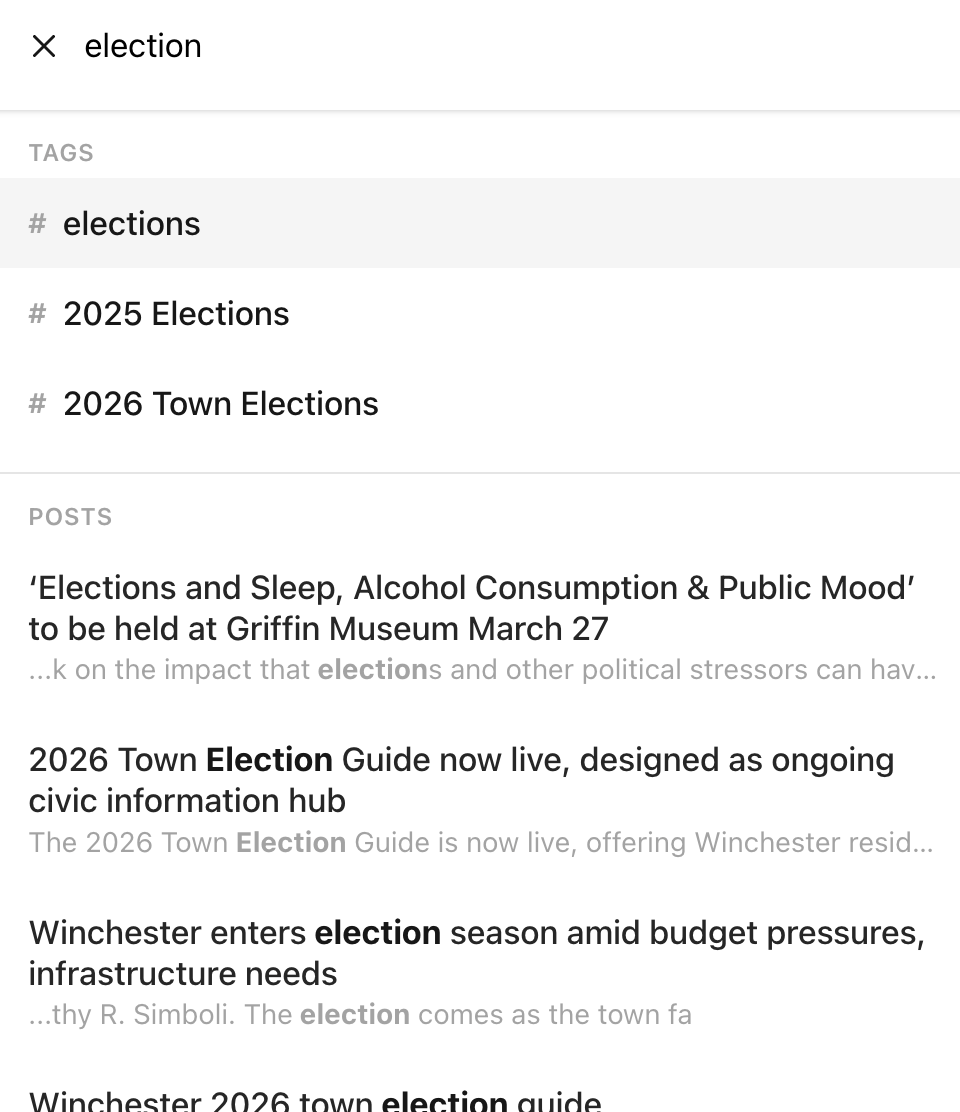
Start typing a word, say “election” and you will see two groups of results, “TAGS” and “POSTS.” Tags will have a “#” in front. Sometimes, tags are listed first, sometimes posts.
- Archive: The right end of the tab menu at the top of the landing page is Archive: a list of every article published on Winchester News since the first one on May 3, 2023, with the latest on top. It can be a handy way to browse “backwards” in time, in case you missed an article.
No matter which tags or section (maybe it wasn’t in News or Events), it will show up here in the Archive.
- Finally, there is a rather unobtrusive symbol at the bottom of the page, below the bottom logo and above the footer “Subscribe to Winchester News.” This is an RSS feed, or “really simple syndication” newsfeed, and can be read in “RSS reader” software.

An example is feeder.co, which can present the news articles in reverse chronological order, even if they have “fallen off” the main landing page, and doesn’t care what tags have been applied to articles.
Browser plugins are also available for quick access to the latest articles, and you don’t have to hunt for it.
Now, dear Power Reader, you have more options to discover and enjoy the inner core of information published on Winchester News. Happy reading!
Shukong Ou is a member of the Winchester News Advisory Board.